Get free access

Guided AI signal bot for binary options

TradeGPT AI Signal Bot Four taps from your broker to a signal.

Set your broker and market in the first message and tap Start analysis. TradeGPT asks for the asset and the expiry, shows each check as it reads, then answers CALL, PUT or WAIT with the entry time and the close.

  • Broker, market and Start in one message
  • A four-step rail you can step back on
  • An entry time and an agreement meter
  • A board scan when no asset comes to mind
  • 9 brokers
  • Real market and OTC
  • 4h and 1d free to try
Reads for
  • Pocket Option
  • Quotex
  • Olymp Trade
  • IQ Option
  • Binomo
+4 more

TradeGPT AI Signal Bot

Online · real market open

Free preview

TradeGPT

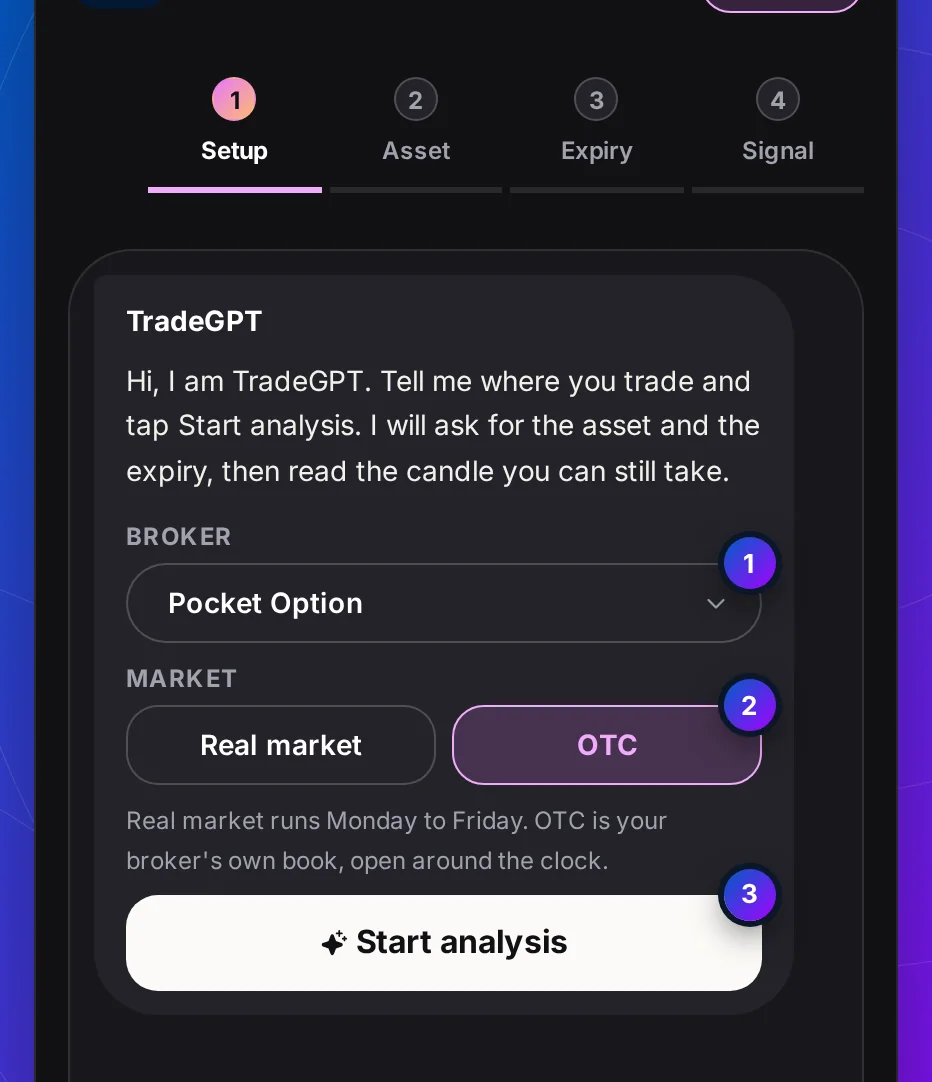
Hi, I am TradeGPT. Tell me where you trade and tap Start analysis. I will ask for the asset and the expiry, then read the candle you can still take.

Broker

Market

Real market runs Monday to Friday. OTC is your broker's own book, open around the clock.

Educational reads, not financial advice. Read the Risk warning.

Get access

Open Every TradeGPT AI Signal Bot Expiry in Three Steps

Tap 4h or 1d at step 3 and TradeGPT already signals for free. Three steps open the fourteen faster expiries, 5 seconds to 2 hours, on every asset in its five lists.

  1. On your broker's siteAbout 2 minutes

    Step 1: Open a partner broker account through our link

    Register on one of these partner brokers, on the broker's own site. An account opened through our link is what makes every TradeGPT expiry free.

    Our partner link
    • Pocket Option
    • Quotex
    • Olymp Trade
    Partner broker sign-up
    • The form is the broker's, not ours
    • Your broker password never reaches us
    • Note your account ID for step 2
    Choose the broker you will set in TradeGPT's first message.
  2. With our support teamUsually a few minutes

    Step 2: Send support your account ID

    Message support with your broker and your account ID. Once they see the account came through our link, they open TradeGPT for the email you sign in with, usually within minutes.

    Message support

    YouHi, I opened a Quotex account through your link. My account ID is below. Please open the fast expiries in TradeGPT AI Signal Bot.

    SupportDone. Sign in and pick any expiry at step 3.

    Telegram, WhatsApp or email. The same team answers each one.
  3. On this pageA few seconds

    Step 3: Sign in and pick any expiry

    Sign in with the email support confirmed. The padlocks leave step 3 of the chat at the top of this page, and a 30-second signal takes the same four taps as a daily one.

    Before you sign in

    5s10s15s30s

    After you sign in

    5s10s15s30s
    Nothing to install. The expiry keys simply open.

What it is

TradeGPT AI Signal Bot: A Signal Bot That Leads the Way

TradeGPT AI Signal Bot is a chat with nothing to type. It asks four short questions in a fixed order and answers the last one with a signal.

The first message already holds everything that does not change between trades: your broker and whether you trade the real market or OTC. Tap Start analysis and the bot asks for the asset, then the expiry. A rail of four steps over the chat shows where you are, and any step you have finished can be tapped to change that answer.

The answer is a signal card: CALL, PUT or WAIT, an agreement meter, the entry time and the close in UTC, and the three inputs behind it. When the candle closes the bot says so, keeps your setup, and offers the next candle in one tap.

TradeGPT never logs in to your broker, never sees your balance and never places a trade. Every stake is yours to decide. Read the Risk warning before you trade with real money.

How to use it

TradeGPT AI Signal Bot, Step by Step

Seven screens, each captured from the bot above: the four steps, the board scan, the read at work and what comes after the close.

Step 1 of 7Set broker and market

Swipe or tap the arrow for the next step

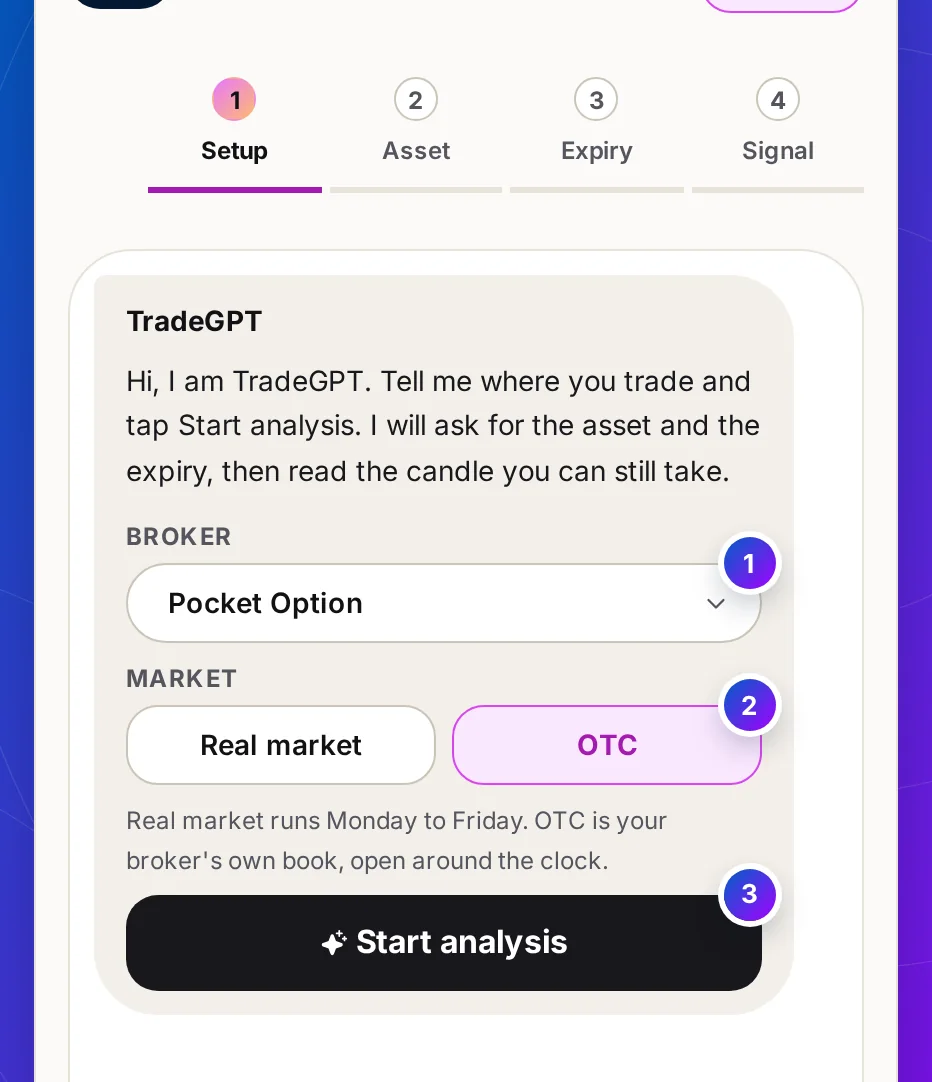
The first TradeGPT message: a Broker listbox set to Pocket Option, Real market and OTC keys with OTC chosen, and a Start analysis key

Step 1 of 7 · Step 1: setup

Pick your broker and market, then Start

What it is
The first message is the whole setup. The Broker listbox names the broker you will trade on, and two keys choose the real market or OTC.
What it does
Start analysis sends your setup and moves the rail to step 2. At the weekend the Real market key says shut, and OTC is already chosen.

What this means for you: set this once per session. Every signal after it is read for this broker and this market.

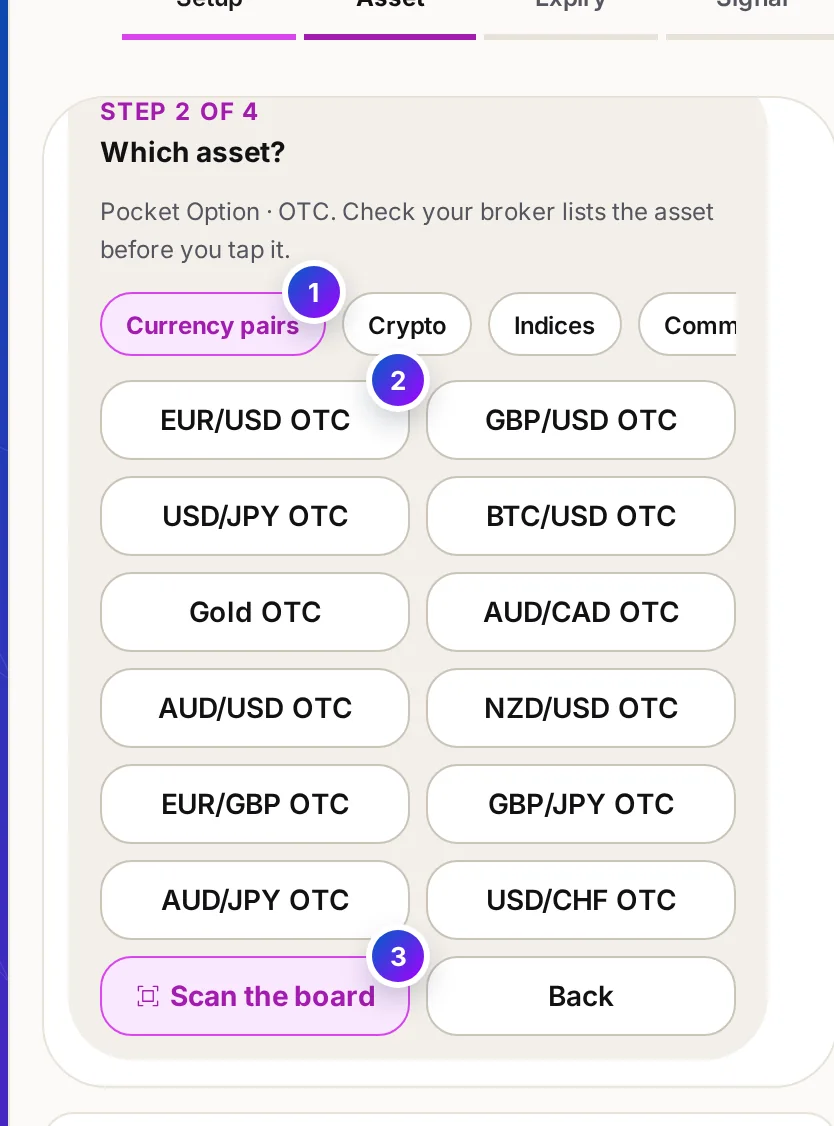
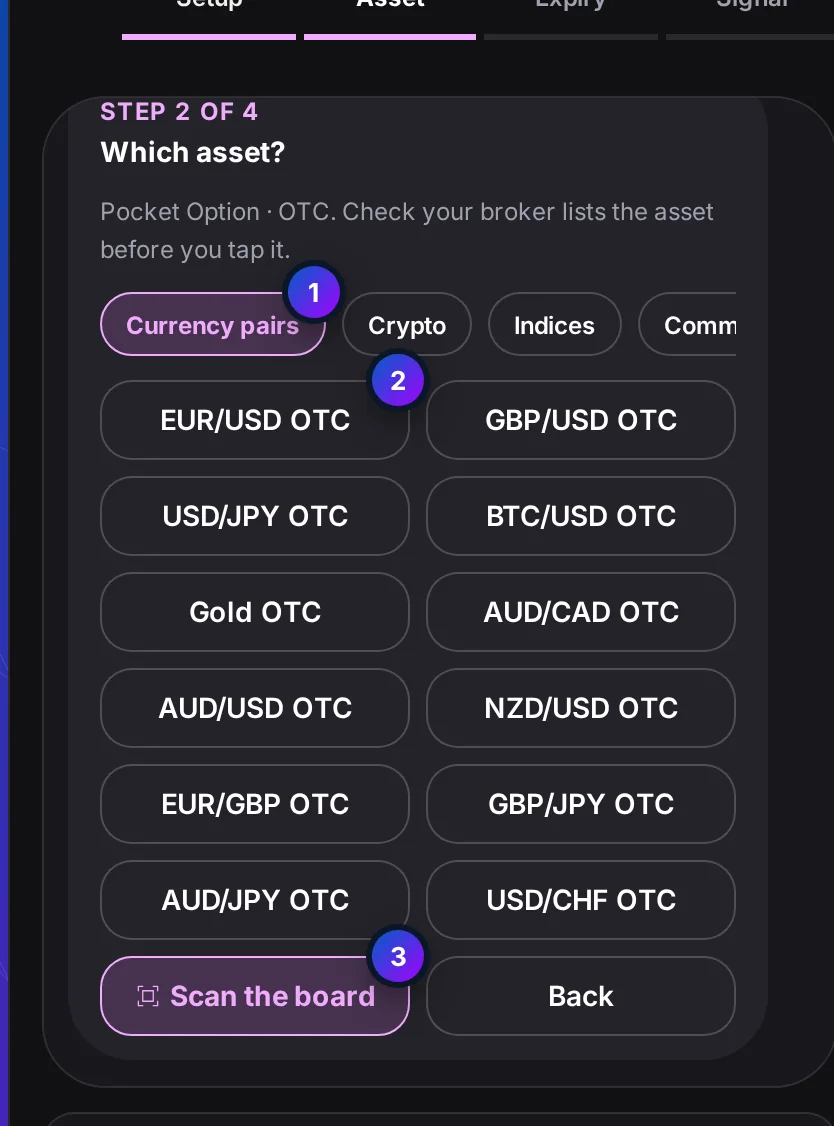
The asset message: five kind tabs with Currency pairs selected, a grid of OTC currency pairs, and Scan the board and Back keys

Step 2 of 7 · Step 2: asset

Filter by kind, then tap the asset

What it is
Five tabs filter the list: currency pairs, crypto, indices, commodities and stocks. The grid under them changes in place.
What it does
Tap an asset and the bot moves on to the expiry. Back returns to the setup message with your answers still set.

What this means for you: open your broker's asset list beside the chat. An asset your broker does not list is a signal you cannot trade.

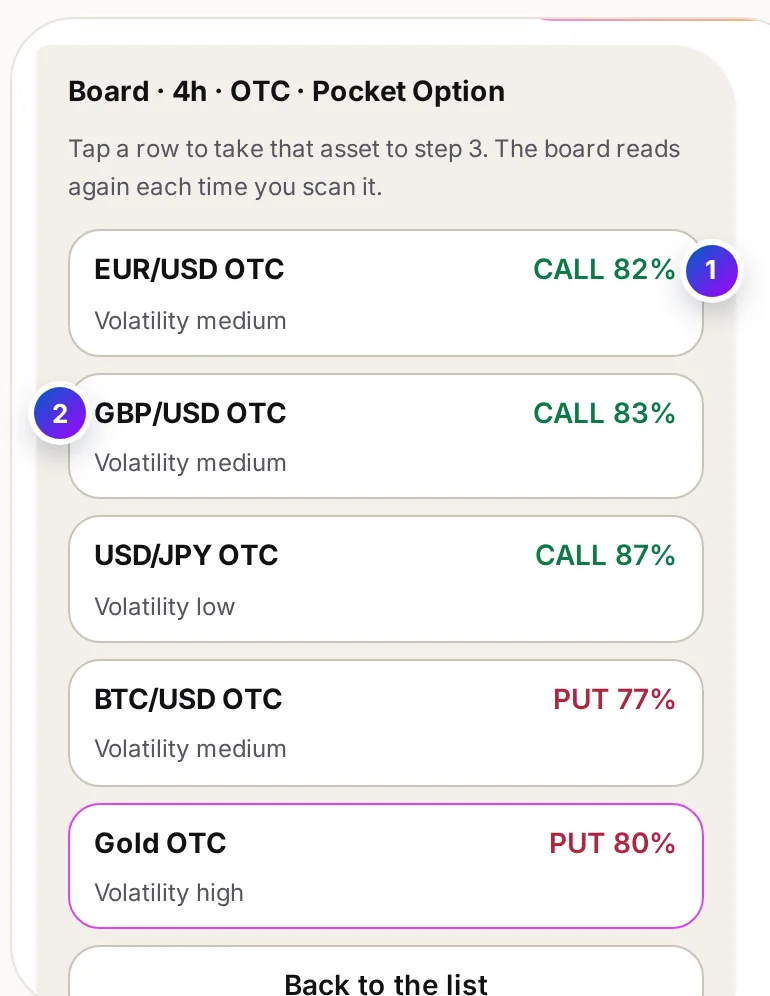
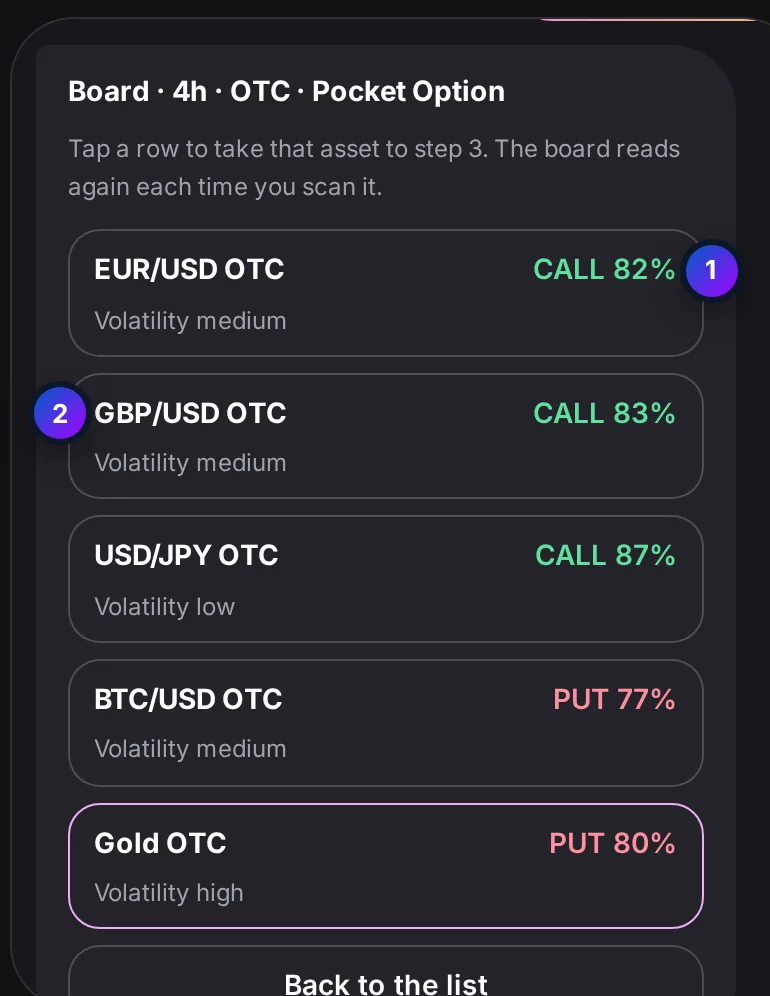
The board message: five major assets, each a row you can tap, with CALL, PUT or Mixed, its agreement and its volatility

Step 3 of 7 · Step 2: or scan

No asset in mind? Scan the board

What it is
Scan the board reads five major assets at once and lists each as CALL, PUT or Mixed, with its agreement and volatility.
What it does
Each row is a key: tapping one takes that asset to the expiry step. Back to the list returns to the asset grid.

What this means for you: the board is a starting point. The signal you act on is still the one read for your own expiry.

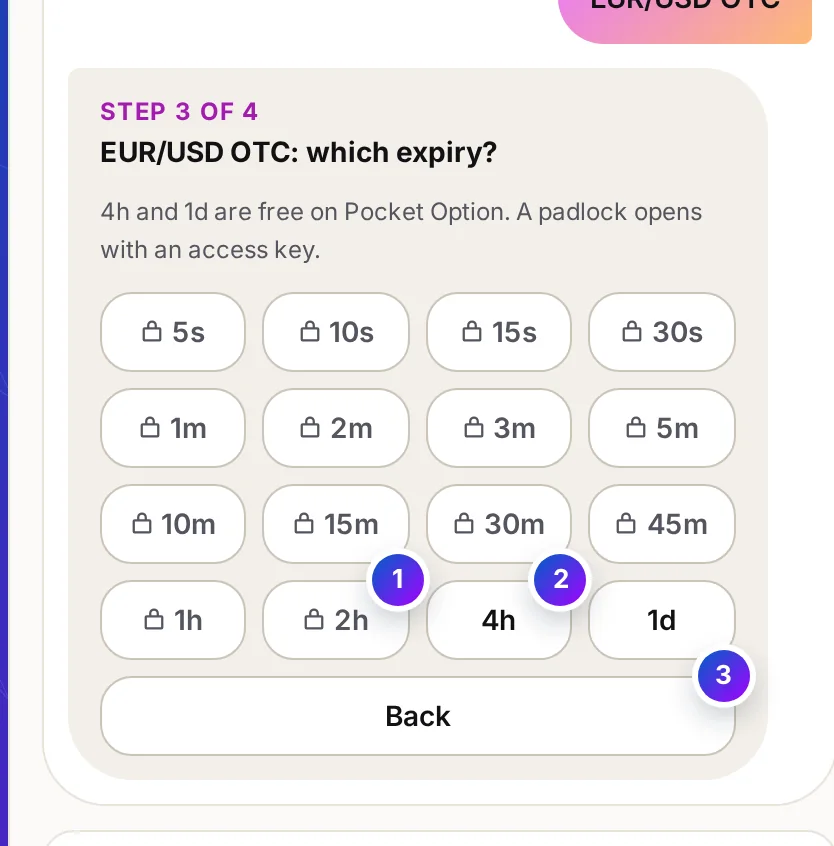
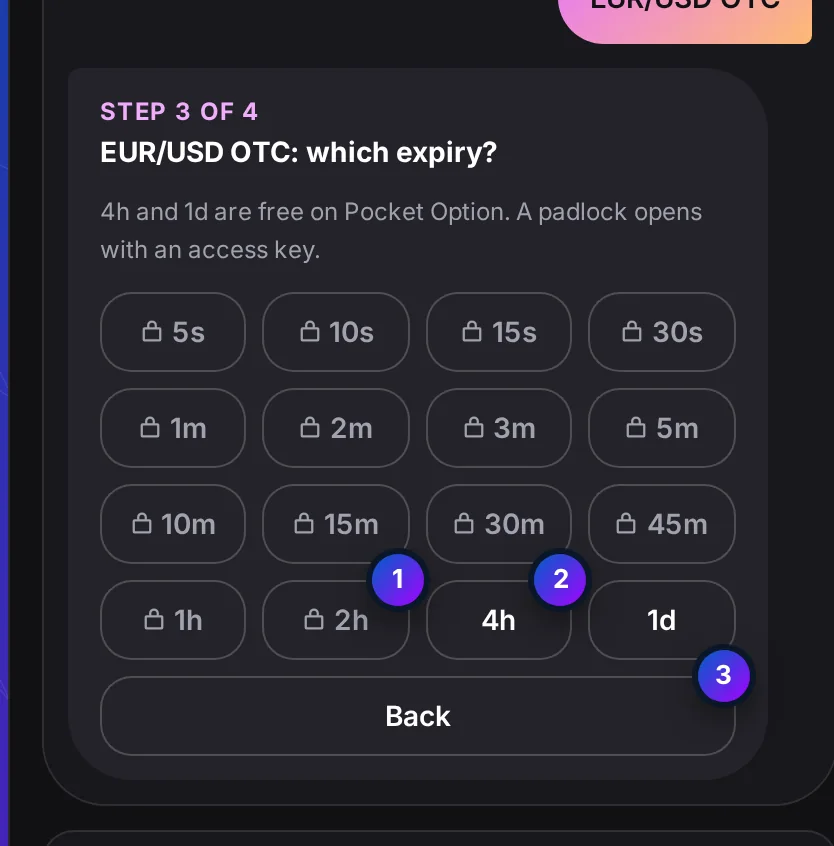
The expiry message: sixteen keys from 5s to 1d in rows of four, padlocks on the faster ones, 4h and 1d open

Step 4 of 7 · Step 3: expiry

Tap the expiry you will buy

What it is
Sixteen expiries, from 5 seconds to 1 day. 4h and 1d are free to try on most brokers. The faster ones carry a padlock.
What it does
A padlock opens the support window for free access or a plan. Any open key starts the read at once, and Back returns to the asset.

What this means for you: pick the expiry before you see the signal, never after. A read for one candle length does not describe another.

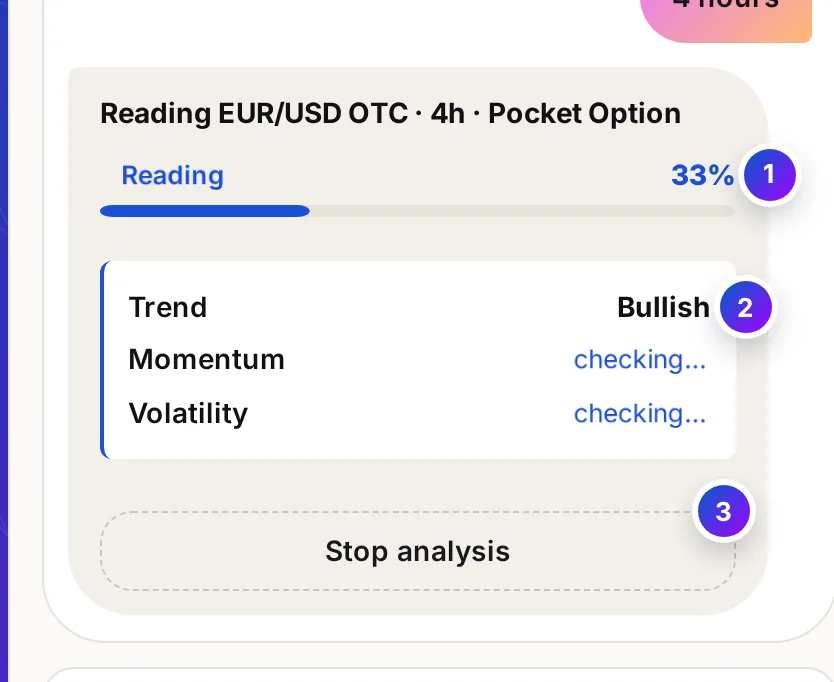
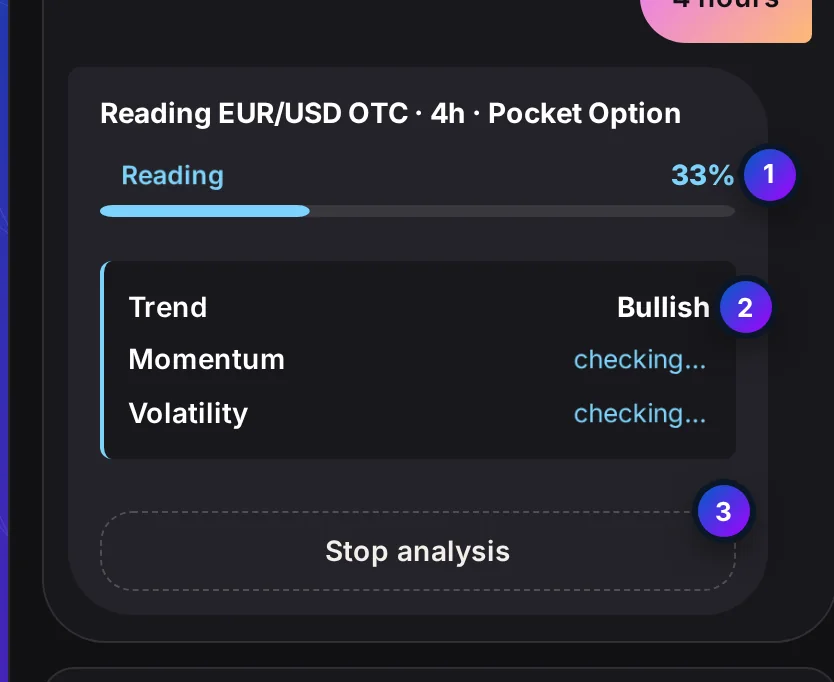
The analysis message: a scan bar at 66 percent, Trend and Momentum checked with what they found, Volatility still checking, and a Stop analysis key

Step 5 of 7 · The read

See every check before the answer

What it is
The bot writes out each input as the engine weighs it, trend, then momentum, then volatility, and a bar fills as each one lands.
What it does
Stop analysis calls the read off and keeps nothing. The read itself comes from the signal engine, not from this page.

What this means for you: read what each line found. Strong trend with weak momentum is a smaller trade, or no trade.

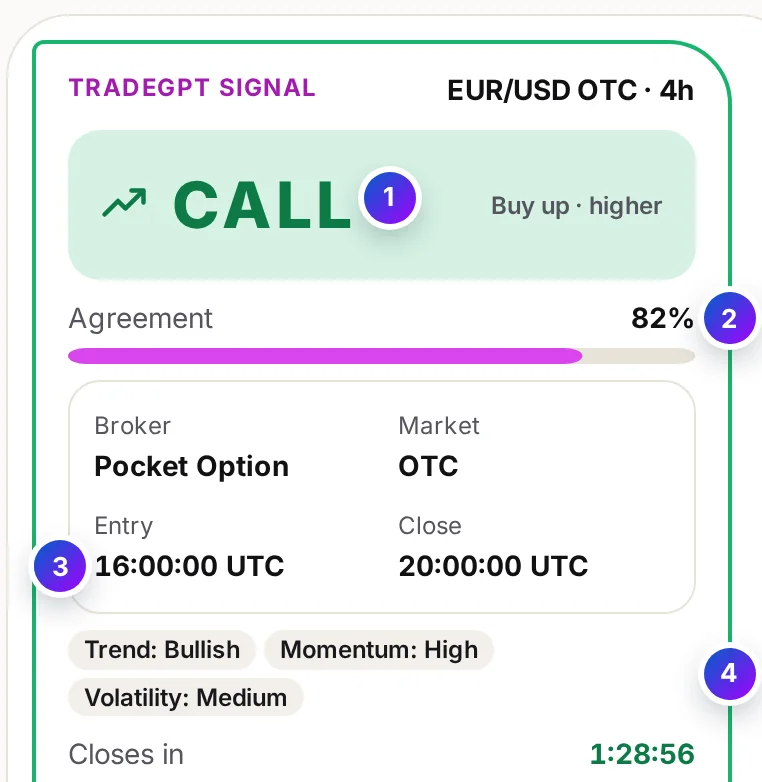
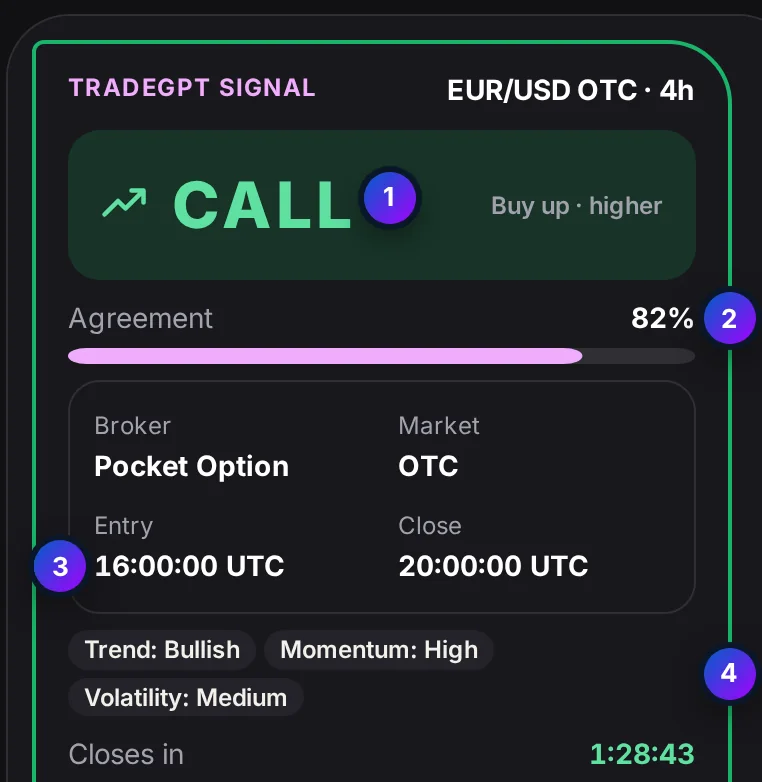
The signal card: a CALL banner, an agreement meter, the broker, market, entry time and close, three reason chips and a countdown

Step 6 of 7 · Step 4: signal

CALL or PUT, its agreement and its entry time

What it is
The signal card leads with CALL, PUT or WAIT. Under it: the agreement meter, the broker and market, the entry time and the close in UTC, and the three inputs as chips.
How to read it
CALL means buy up, PUT means buy down. On an expiry under an hour with little of the candle left, the card waits for the next candle and counts down to its entry.

What this means for you: enter at the entry time, on the same expiry. When the candle closes, check it on your own chart.

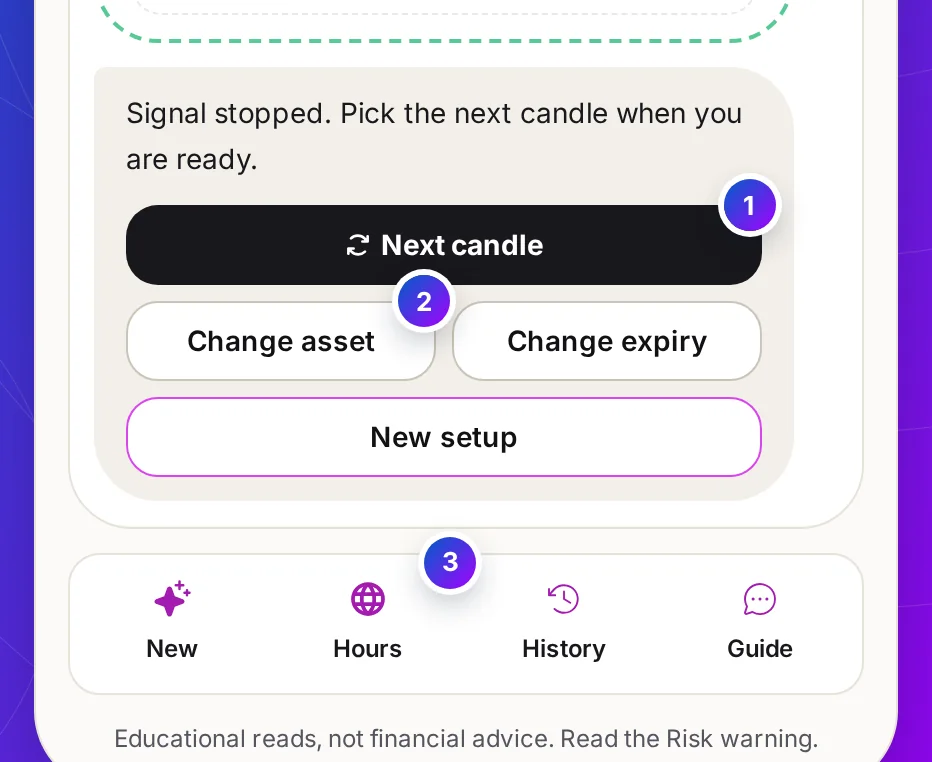
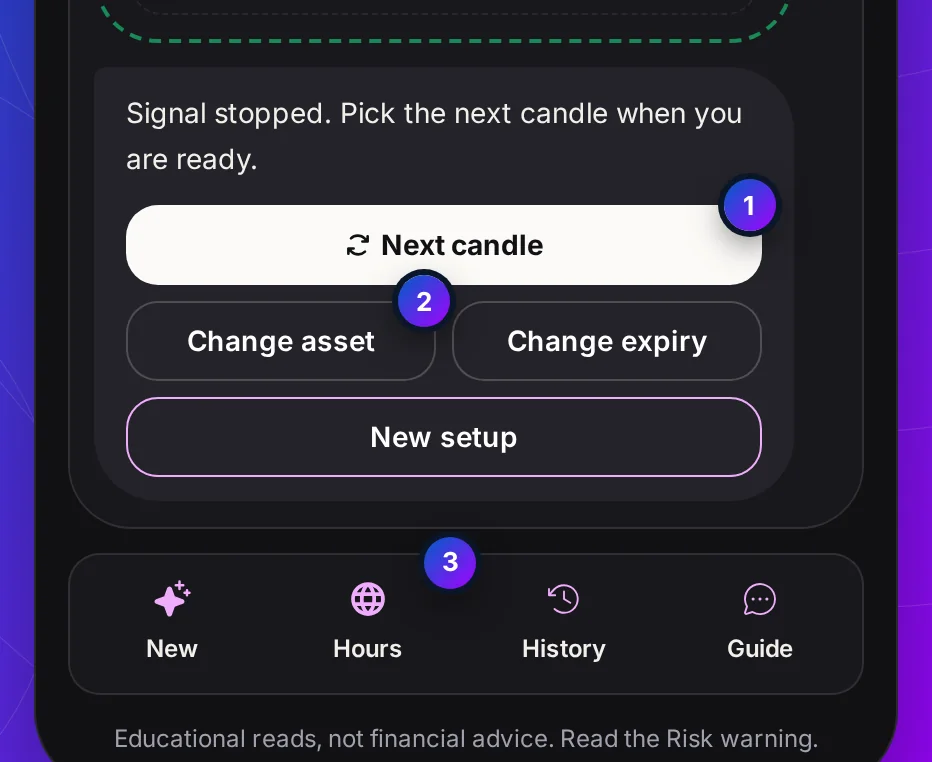
The message after a signal ended: Next candle, Change asset, Change expiry and New setup keys, with the dock of New, Hours, History and Guide under the chat

Step 7 of 7 · After the close

Next candle, or change one answer

What it is
When the candle closes the bot posts one line and four keys: Next candle, Change asset, Change expiry and New setup.
What it does
Next candle reads the same asset and expiry again. The dock under the chat holds New, Hours, History and Guide: a fresh setup, market hours, your recent signals and how to read a card.

What this means for you: one tap per candle keeps a session even. Your stake and your stop are still yours to set.

At a glance

Every Part of TradeGPT AI Signal Bot in One Picture

TradeGPT AI Signal Bot: Four taps from your broker to a signal. Broker, market and Start in one message. A four-step rail you can step back on. An entry time and an agreement meter. Its app on the right shows a CALL read with its AI confidence.

At a glance

TradeGPT AI Signal Bot, Line by Line

Everything TradeGPT AI Signal Bot does and does not do, in one table, before you open your broker.

Brokers
Pocket Option, Quotex, IQ Option, Olymp Trade, Binomo, Exnova, Bubinga, Deriv and Alpari
Steps to a signal
Four: setup, asset, expiry, then the signal. A rail shows each one and steps back to it
Assets
Currency pairs, crypto, indices, commodities and stocks, on the real market and on OTC
What you get
CALL, PUT or WAIT, an agreement meter, the entry time and the close in UTC, and the three inputs
Expiries
16, from 5 seconds to 1 day. 4h and 1d are free to try on most brokers
Around the signal
A five-asset board scan, market hours, your recent signals and a how-to card
Typing
None. Every answer is a key
Who places the trade
You do, on your own broker. TradeGPT never trades
Price
Free with a partner broker account, or $49 a month, or $199 once
Accuracy figure
None published. A signal is not a promise, and the bot never scores one
How it works

How TradeGPT AI Signal Bot Works, From Setup to Signal

Four taps and a short read, about fifteen seconds from the first message to a signal.

  1. 0 s

    Set up once

    Choose your broker and Real market or OTC in the first message, then tap Start analysis.

  2. 4 s

    Name the asset

    Filter by kind and tap the asset, or scan the board and take one of its five.

  3. 8 s

    Name the expiry

    Tap the expiry you will buy. The bot reads at once and shows each check.

  4. 14 s

    Act, or let it pass

    CALL, PUT or WAIT with its entry time. If you take it, buy the same expiry on your broker, then tap Next candle.

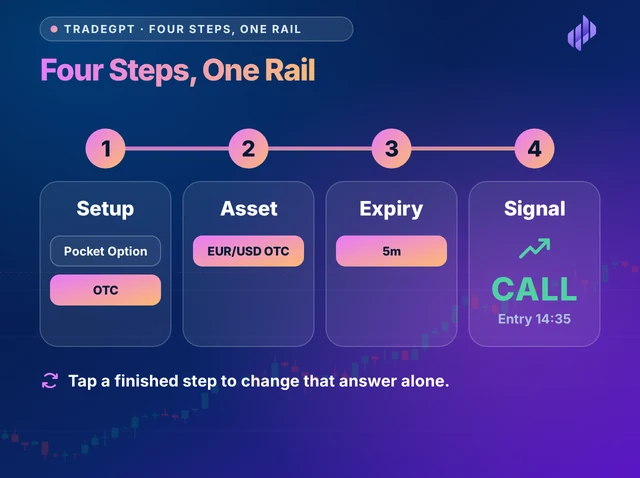
Illustration titled Four Steps, One Rail: the setup, asset, expiry and signal steps as four connected cards, each with the answer chosen on it
Four steps to a signal

Four steps, one rail

TradeGPT AI Signal Bot Shows the Whole Route Before You Start

A signal needs four answers, and TradeGPT asks for them in the same order every time: setup, asset, expiry, signal. The rail over the chat lights each step as you reach it. Tap a finished step to change that answer alone, without starting the conversation again.

  • Broker and market set in the first message
  • One question per message after that
  • Any finished step can be changed
  • No text box, no commands to learn
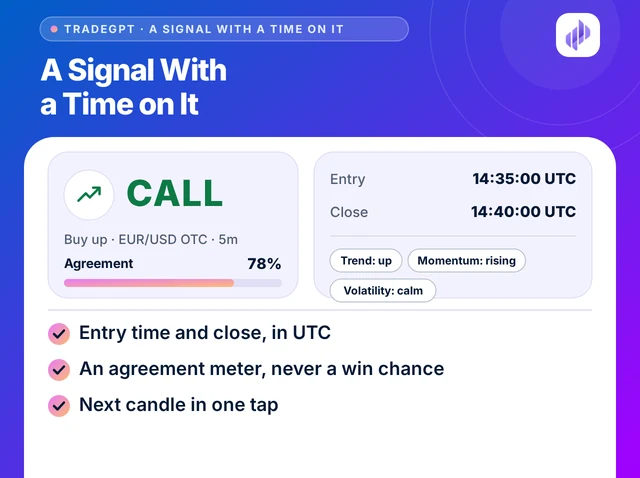
Illustration titled A Signal With a Time on It: a CALL card with its agreement meter, the entry time and close, and three reason chips
Entry time on every signal

A signal with a time on it

Every TradeGPT AI Signal Bot Signal Carries an Entry Time

CALL or PUT is half an answer. The signal card adds the entry time and the close in UTC, an agreement meter and the three inputs behind it, so you buy the candle that was read. When it closes, the bot says so and never calls the trade a win or a loss.

  • Entry time and close, in UTC
  • An agreement meter, never a win chance
  • Trend, momentum and volatility as chips
  • Next candle in one tap

Expiries

TradeGPT AI Signal Bot Expiries, 5 Seconds to 1 Day

Step 3 offers sixteen expiries. The one you tap sets how long the signal holds and how often you will be back for the next candle.

  1. 5s to 30s

    For quick OTC sessions

    The card may already point at the next candle when it lands. Fix your stake before you tap Start.

  2. 1m to 5m

    The everyday range

    Enough time to read the card and its reasons before the entry, and several signals in one sitting.

  3. 10m to 2h

    For a few checks a day

    Fewer signals, each with room to breathe. Suits a trader who looks in between other things.

  4. 4h and 1d

    Free to try on most brokers

    No key needed. Compare a few of TradeGPT's signals with your own chart before you unlock the faster ones.

On IQ Option the free expiry is 1h, and on Olymp Trade its 23h expiry. TradeGPT opens every expiry the server allows for your broker, and no other.

Free and unlocked

Judge TradeGPT AI Signal Bot on the Free Expiries First

Opens with a key14 expiries, 5 seconds to 2 hours

Free to trymost brokers

  1. 5s
  2. 10s
  3. 15s
  4. 30s
  5. 1m
  6. 2m
  7. 3m
  8. 5m
  9. 10m
  10. 15m
  11. 30m
  12. 45m
  13. 1h
  14. 2h
  15. 4h
  16. 1d
  • Monthly plan

    $49 a month

    Keep the broker account you have. Every bot, every expiry. Or pay $199 once for life.

    Choose the plan

Assets

Five Asset Lists in TradeGPT AI Signal Bot

Step 2 filters these by kind. With OTC chosen in the setup, each is marked OTC. Check your broker lists an asset before you tap it.

Currency pairs

  • EUR/USD
  • GBP/USD
  • USD/JPY
  • BTC/USD
  • Gold
  • AUD/USD
  • USD/CAD
  • USD/CHF
  • EUR/JPY
  • GBP/JPY
  • EUR/GBP
  • AUD/CAD

Crypto

  • BTC/USD
  • ETH/USD
  • LTC/USD
  • XRP/USD
  • SOL/USD
  • BNB/USD
  • ADA/USD
  • DOGE/USD

Indices

  • US 500
  • US Tech 100
  • Wall Street 30
  • Germany 40
  • UK 100
  • Japan 225
  • Australia 200
  • France 40

Commodities

  • Gold
  • Silver
  • Brent Oil
  • WTI Oil
  • Natural Gas
  • Platinum
  • Palladium
  • Copper

Stocks

  • Apple
  • Microsoft
  • Tesla
  • Amazon
  • Alphabet
  • Meta
  • Nvidia
  • Netflix

A general AI chat or this bot

Ask a General AI Chatbot, or Use TradeGPT AI Signal Bot?

Many traders type their question into a general AI chatbot first. Here is how that usually differs from a bot built for one job.

Ask a General AI Chatbot, or Use TradeGPT AI Signal Bot?
What to compareA general AI chatbotTradeGPT AI Signal Bot
What you doWrite a question in your own wordsTap four answers, nothing to type
Your broker and expiryExplained again in every questionSet once in the first message
The answerParagraphs, often hedgedCALL, PUT or WAIT with an agreement meter
When to enterNo candle attachedAn entry time and a close in UTC
The same question twiceCan come back worded differentlyOne read per candle, the same each time you ask
Who places the tradeYouYou, on your broker. TradeGPT never trades

Risk controls

Five Rules to Write Down Before Your First TradeGPT Signal

TradeGPT reads and stops there, so the limits that protect your balance are yours. Set them before the first Start analysis of the day.

Next candle puts another signal one tap away, and a guided chat makes each one feel routine. That is when a fixed stake and a hard stop matter most.

A rule made after a losing trade is usually a reason for one more. Write yours while nothing is at stake, and keep the list beside the chat.

FAQ

TradeGPT AI Signal Bot: Questions Traders Ask

Not made by, or connected with, OpenAI, ChatGPT or any broker. Educational tools, not investment advice. Trading carries a risk of loss; read the Risk warning first.

Free with a partner broker

One Key Opens Every TradeGPT AI Signal Bot Expiry

Ask support for free access, or choose a plan and keep the broker account you have.

Partner program

Know Traders? Earn 40% Every Month.

Traders who want a bot that tells them what to tap next can start here. When one of them buys a plan with your coupon code, 40% of each payment is yours, every month they stay.

  • 40% for life
  • Paid monthly
  • No cap
Partner earningsRecurring

40%of every payment your referrals make

  • Your share40%
  • PaidEvery month
  • LastsWhile they stay
  • Earning capNone

Commission is paid on the plans your referrals buy, not on sign-ups. Trading carries a risk of loss; read the Risk warning first.

Free access

Get Every Bot for Free

Message our 24/7 support team. They help you open an account with a partner broker, then send your free access key for all 14 bots.

Already have a licence key?

Replies usually arrive within minutes during business hours.